
New row violates row‑level security policy: fix the Supabase insert
The table editor saves the row. The app returns “new row violates row‑level security policy.” Read the failure and fix the write.
Table of content
- What the message is telling you
- Read the failed request
- Fix the mismatch
- Prove it with two users
- When another prompt makes the data less safe
- Hand the repository to someone who will ship it
- Questions the error raises
 EWS Automation
- 10 Nov, 2026

You saved a row in the Supabase table editor. The same save from the app returned this:
new row violates row-level security policy for table "notes"Lovable, Bolt, Cursor, v0, Replit, and Claude Code all produce that sentence on the first real write. Read the failed request before you accept another policy from the chat, and leave row‑level security on.
What the message is telling you
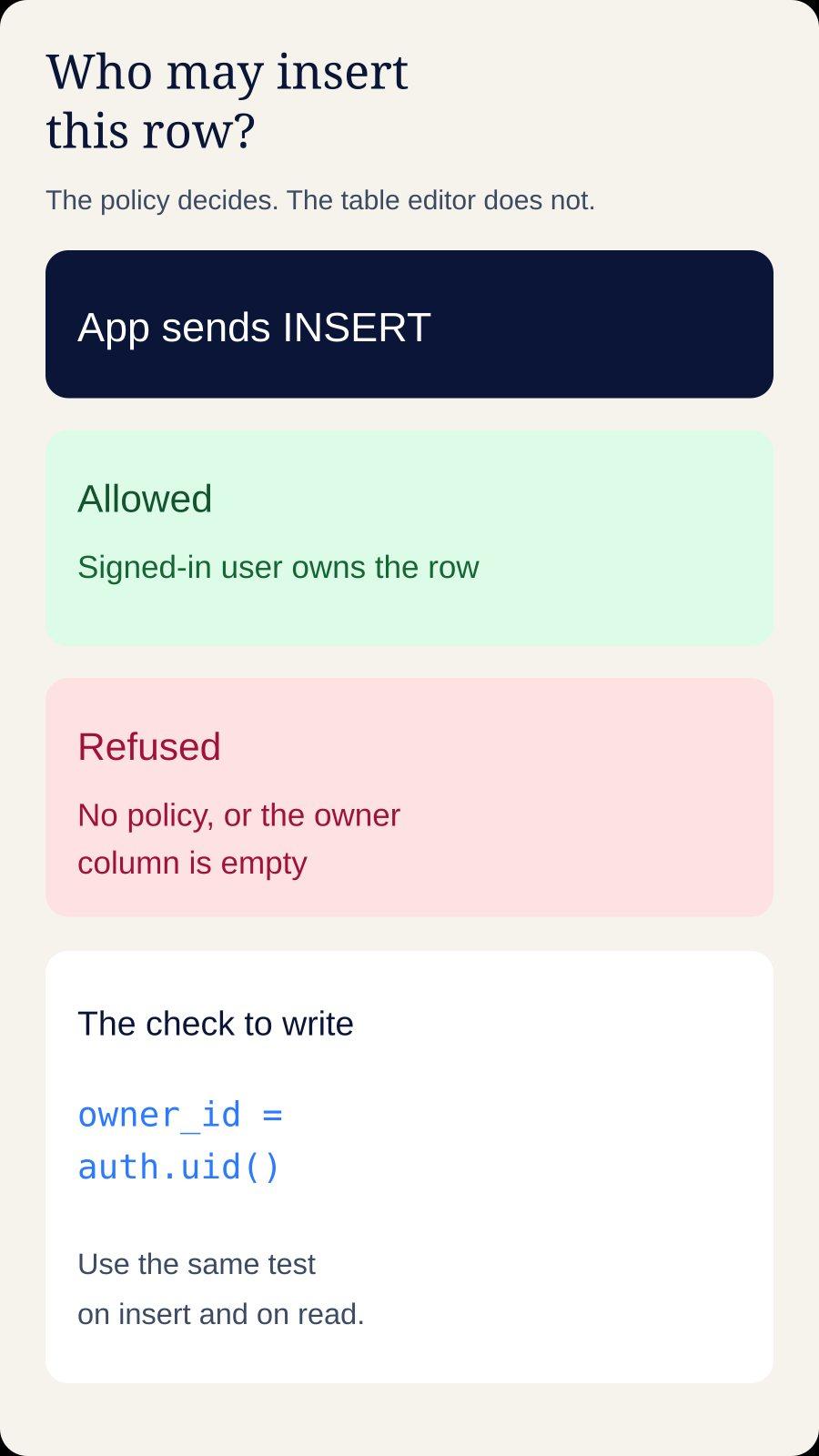
Row‑level security is on for that table. Postgres checked the new row against the insert policies for the role that sent the request. No policy allowed the row, so the insert was rejected. The SQLSTATE is 42501. supabase‑js returns { data: null, error } and sets error.code to "42501".
The table editor runs with a role that bypasses these policies. A row you type there shows that the table exists. The app sends the publishable anon key and, once someone is signed in, that person's access token.
A blocked read returns the rows the policy allows. An empty list is still HTTP 200 and []. The production checklist for that screen is How to Deploy a Lovable App on Vercel.
permission denied for table notes is the other 42501. The role has no grant, and Postgres raises it before any policy runs. Supabase's Data API changelog says new tables in public stay unreachable until you grant them: optional from 28 April 2026, the default for new projects from 30 May 2026, and set for existing projects on 30 October 2026. The row‑level security guide still describes many existing projects as granting anon, authenticated, and service_role automatically. Trust the sentence you received. A GRANT hint means add that grant. This error means a policy refused the row.
Read the failed request
Submit the form once with devtools open. Find the POST to /rest/v1/ plus the table name in the error.
The response body. Copy
code,message, andhint. A hint that begins withGrant the required privilegesis the missing grant.The
Authorizationheader. A signed‑in request carries the user's access token. The anon key alone means the role isanon, andauth.uid()is null. The guide saysauth.uid()returns null when the token is missing or the session has expired.The JSON body. A check of
auth.uid()againstuser_idfails when the body omitsuser_id.The
Preferheader.return=representationmeans the client chained.select()and asked for the new row back.
Then list the policies. In the SQL editor, replace notes with your table:
select polname,
       polcmd,
       pg_get_expr(polqual, polrelid) as using_expr,
       pg_get_expr(polwithcheck, polrelid) as check_expr
from pg_policy
where polrelid = 'public.notes'::regclass;
polcmd is r for select, a for insert, w for update, d for delete, and * for every command. An insert needs a or *. A select policy leaves the insert refused.
And the grants:
select grantee, privilege_type
from information_schema.role_table_grants
where table_schema = 'public'
  and table_name = 'notes'
  and grantee in ('anon', 'authenticated', 'service_role');
If authenticated has no INSERT grant, add the grant before you write another policy. Permissive policies, the default, combine with OR. A leftover using (true) or with check (true) still allows the row after you add a stricter policy. Drop that generated policy, or the strict one never gets the last word.
Fix the mismatch
Use this when each row belongs to one signed‑in user and the owner column is user_id. If yours is owner_id or created_by, use that name in every line.
Run it as one script, after you have read the policies already on the table. The revoke clears broad grants on anon and authenticated, and the next statement grants those operations back. service_role stays as it is. It bypasses row‑level security, so keep it on a server you control.
Fill a null user_id before you run this on a table that already has data. Those rows miss the new select policy and disappear from the app. They remain in the table:
select id, user_id from public.notes where user_id is null;alter table public.notes enable row level security;
revoke all on table public.notes from anon, authenticated;
grant select, insert, update, delete on table public.notes to authenticated;
drop policy if exists "notes_select_own" on public.notes;
drop policy if exists "notes_insert_own" on public.notes;
drop policy if exists "notes_update_own" on public.notes;
drop policy if exists "notes_delete_own" on public.notes;
create policy "notes_select_own"
on public.notes
for select
to authenticated
using ((select auth.uid()) = user_id);
create policy "notes_insert_own"
on public.notes
for insert
to authenticated
with check ((select auth.uid()) = user_id);
create policy "notes_update_own"
on public.notes
for update
to authenticated
using ((select auth.uid()) = user_id)
with check ((select auth.uid()) = user_id);
create policy "notes_delete_own"
on public.notes
for delete
to authenticated
using ((select auth.uid()) = user_id);WITH CHECK rules the new row. USING filters rows that already exist. The subquery around auth.uid() is there so Postgres can evaluate it once per statement. Name the role with to. A policy with no to clause applies to every role. drop policy if exists clears only these four names, so also drop any using (true) or with check (true) policy on a private table. Save the SQL under supabase/migrations. A dashboard‑only rule is missing from the next project.
No insert policy
Generated projects often turn row‑level security on, add a select policy so the list renders, and stop. With no insert policy, every insert is refused. That is the default. notes_insert_own is the missing statement when the signed‑in user owns the row.
The owner column is empty
(select auth.uid()) = user_id is unknown when user_id is null, so Postgres refuses the row. Set the owner in the database, where the next generated client still gets it:
alter table public.notes
  alter column user_id set default auth.uid();
An insert that omits user_id gets the default. A value the client sends is kept, and with check refuses someone else's id. The table editor has no user JWT, so type user_id there yourself. You can also send it from the client once the session is real:
const { data: { user }, error: userError } = await supabase.auth.getUser();
if (userError || !user) {
  throw new Error("Sign in before saving");
}

const { error } = await supabase.from("notes").insert({
  title,
  user_id: user.id,
});
if (error) console.error(error.code, error.message);
getUser() asks the Auth server. getSession() reads the browser token, which can be stale. Keep the column default as well. On an empty table, set user_id not null. Where nulls already exist, give each row a real owner first. One account for every old row assigns other people's data to the wrong user.
The request has no signed‑in user
A policy with to authenticated applies when a session exists. A request with no session runs as anon. auth.uid() is null, the comparison matches nothing, and the insert is refused.
Generated apps often write from a useEffect that does not wait for the session. The first click fails and a later click works. Log the user on the line before the insert. A null user on the failing attempt is this cause. Leave the save control disabled until onAuthStateChange has delivered a session.
Anonymous sign‑in is separate from the anon role. That user takes the authenticated role, so notes_insert_own allows the write. The row‑level security guide separates them with the is_anonymous claim. For a private row per visitor, keep anonymous sign‑in. For email accounts, turn it off in Auth settings.
A contact form or a waitlist has no account, so the writer is anon on purpose:
create policy "leads_insert_public"
on public.leads
for insert
to anon, authenticated
with check (true);
Anyone who can load the page can insert, including a script. Keep the columns to an email, a message, and a timestamp, with a length check. Leave select, update, and delete closed to anon. using (true) on select publishes the table, and the anon key is already in the bundle.
The insert asked to return the row
.insert().select() sets Prefer: return=representation. Postgres runs INSERT ... RETURNING and checks the returned row against select policies. A miss raises the same error. Drop .select() once. If the row appears in the table editor, add notes_select_own and put .select() back.
An upsert that changes an existing row needs notes_update_own too. The guide says an update also needs a select policy, or it will not work as expected. USING picks the existing row. WITH CHECK keeps an update from moving user_id onto someone else.
The check reads another table
A policy can require a matching row in a second table:
with check (
  exists (
    select 1
    from public.org_members m
    where m.org_id = notes.org_id
      and m.user_id = (select auth.uid())
  )
)
Name the outer column notes.org_id. An unqualified org_id inside the subquery can bind to org_members and match every row. If this user cannot read their own membership, exists is false and the insert fails. The error names the table you wrote, so add the select policy on org_members in the same script.
Read a security definer function before you run it. It sees every row its body selects. Set search_path, grant execute only to authenticated, and return a boolean. A policy on notes that reads notes raises infinite recursion detected in policy for relation "notes". Keep membership in its own table.
Prove it with two users

The script fits a single owner column. Any other shape needs the same proof, because a copied policy can lock the real owner out or leave the table open.
Create two users under Authentication, or sign up twice.
As user A, in a private window, insert a note from the app on the production URL. It succeeds, and the list shows that note.
As user B, in a second private window, the list shows B's notes. A's note is absent, and opening A's row by id comes back empty.
Signed out, the insert is refused, unless this table is the public form above.
The builder preview is often still signed in as the project owner, and the table editor shows every row because it bypasses policies. The private window matches a visitor. Testing and code review is how the check survives the next change. A dashboard edit with no migration drifts the first time a prompt rewrites the SQL.
When another prompt makes the data less safe
Keep going while you can point at the request, the policy, and the owner column, and a second user fails the way you expect.
Send the repository when any of these are true.
Row‑level security is off on other people's data, or select uses
using (true)foranonor for everyauthenticateduser. If aservice_rolekey is in aNEXT_PUBLIC_orVITE_variable, rotate it, then close the table. That key bypasses policies, and those prefixes ship in the browser.You cannot name the owner column. Database development is naming it and storing the grants and policies as a migration.
Several prompts replaced the policy and the error text stayed the same. The network request is the input the chat does not have.
Two tables check each other, and you have recursion or a membership check that is always false.
The write is inside checkout. A webhook that retries needs a write that can run twice and land once.
When prompting is the only way the project moves, the longer version of that decision is “It still doesn’t work. Fix it.”
Hand the repository to someone who will ship it
For a single‑owner table, you are done when authenticated has the grant, insert and select policies compare (select auth.uid()) to user_id, that column defaults to auth.uid(), and two accounts on the production URL pass the test above. Organizations, a public form that must stay private to read, and policies that exist only in the dashboard are past that. EWS Automation takes over the repository, checks the policies against the requests the app sends, and ships a version a second user cannot see through.
Tell us which table refuses the row. Bring the error text and the URL where it happens. We will take the project from that failure to a release you can put in front of customers.
Questions the error raises
Why does the Supabase table editor save the row when the app cannot?
The table editor uses a role that bypasses row‑level security. The app uses the publishable anon key, and the signed‑in user's access token when a session exists. A save in the editor shows that the table exists. The app still has to pass a grant and an insert policy.
Why does insert().select() fail when a plain insert works?
.select() asks the API to return the new row. Postgres checks that row against your select policies and raises new row violates row‑level security policy when the row fails them. Add a select policy for the same owner, then call .select() again.
What is the difference between this error and “permission denied for table”?
Both can be SQLSTATE 42501. permission denied for table means the role has no grant, and the response hint names the grant to add. new row violates row‑level security policy means the role can reach the table and an insert policy refused this row.
Should row‑level security stay on?
Leave it on. The anon key is in the browser bundle. With row‑level security off, a role that still has a grant can read and write every row. Write an insert policy for the role that calls the API, and confirm it with a second user.
The row was refused. The app can still ship.
Send the repository and the error text. EWS will take over the project, fix the data rules, and ship it.
Talk through your projectRelated Articles
How to Deploy a Lovable App on Vercel
The preview works. On Vercel, a refresh 404s, the page is blank, or login returns to localhost. Here is why.
EWS Automation
“It still doesn’t work. Fix it.” Sound familiar?
When prompting becomes a second job, it may be time to hand the development to a team.
EWS AutomationReady to put AI to work in your business?
Bring the idea or the workflow. We’ll help you find a useful next step.
Schedule a free consultation